~/ live on npm · free forever · bring your own key

Never Google a stack trace again.

Something breaks. You type wtf. You get the diagnosis, the evidence from your own terminal, and the fix, with an honest answer about how sure it is.

> npm install -g wtf-terminal

Windows · CMD / PowerShell Linux & macOS in testing. Get one email when yours lands

Needs Node.js 18+ and a free Gemini key. Two minutes from install to first fix.

~/my-project

Real output, not a mockup. Watch Silent failure. That's the part nobody else shows you.

scroll
01

Three seconds to the fix

  1. 1

    Your build explodes

    Fifty lines of red text. A traceback that mentions everything except the actual problem.

  2. 2

    You type wtf

    It already saw the error happen. No copying, no pasting, no explaining yourself to a chatbot in another window.

  3. 3

    You get a straight answer

    What broke, why, the line that proves it, and the fix: graded by how solid the evidence actually is.

No Copilot? No problem.

Copilot, Cursor, agent IDEs: genuinely great tools, at $10–20 a month, per person, forever. If that's not your reality (you're a student, or "$20 a month" converts to something much heavier in your currency), the AI era shouldn't just skip you.

The subscription stack

  • Monthly seat, billed forever
  • Account, sign-in, credit card
  • Lives inside an IDE plugin
  • Writes code for you

wtf_

  • $0. Your own free Gemini key
  • No account. No card. No telemetry.
  • Lives in the terminal you already have
  • Gets you unstuck, with evidence you can check

Straight with you: wtf won't write your features or refactor your codebase. It does the one thing everyone stops to Google for (figuring out what just broke) and does it for free, forever.

02

Up and running in two minutes

Live on npm for Windows (Command Prompt / PowerShell) today. On Linux or macOS? Support is in testing. Get one email when it ships.

  1. 1

    Install it

    npm install -g wtf-terminal

    Needs Node.js 18+. That's the only prerequisite.

  2. 2

    Add your free Gemini key

    wtf auth

    Grab a free key from Google AI Studio (roughly 1,500 requests a day, $0), then paste it at the prompt. Input is masked, and the key goes straight into your OS keychain. Never a dotfile.

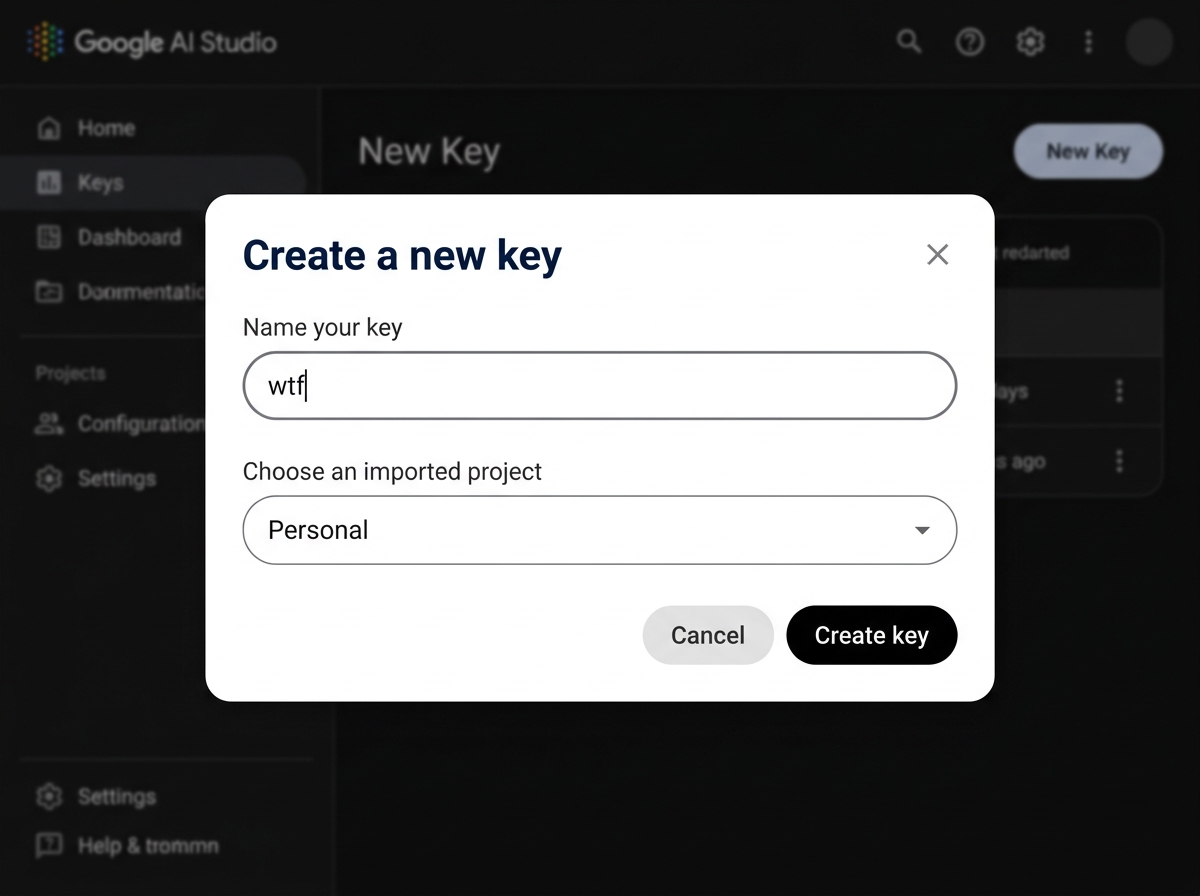
    Never made an API key before? 60-second walkthroughGoogle AI Studio: Create a new API key dialog
    1. Open aistudio.google.com/app/apikey and sign in with any Google account. No credit card, no billing setup. The key is on the free tier by default.
    2. Click the Create API key button in the top-right corner.
    3. Give it any name (like "wtf"), keep the project set to Personal, and click Create key.
    4. You'll see a long string starting with AIza. Copy it. That's your key.
    5. In your terminal, run wtf auth, then paste. It gets stored in your OS keychain, never in a file. Treat it like a password.
  3. 3

    Wrap your shell

    wtf start

    Your terminal looks and behaves exactly as before. It's just quietly watching for failures now.

  4. 4

    Break something, then ask

    wtf

    Diagnosis, the evidence line from your own output, and the fix, graded by confidence. Read the grade, then decide. Nothing ever runs itself.

  5. 5

    Done for the day

    wtf stop

    Or just exit. Pro tip: add wtf start --quiet to your PowerShell $PROFILE and every terminal wraps itself automatically.

03

It tells you how sure it is

Every AI tool sounds confident, including when it's wrong. That's how people end up running nonsense in their terminal. wtf grades its own answer, and the grade changes what you get.

✨ The Fix HIGH

The error is unambiguous and the fix is well-known. You get the diagnosis, the evidence, the exact command, and a way to verify it worked.

⚠ Likely Fix MEDIUM

There's a plausible cause, but your output is ambiguous. The fix is clearly flagged likely, not certain, so you read the evidence before running anything.

🧭 Not Enough Signal LOW

The real error isn't in the output. No command at all, just concrete next places to look. A guess dressed up as an answer is how tools lose you.

And it can't bluff its way to HIGH: the AI must quote the exact line from your terminal that supports its diagnosis, and that quote is checked against your real output in code before anything renders. Fabricated evidence gets the confidence downgraded automatically, and you're told why.

04

The boring parts, done properly

Secrets stay home

AWS keys, GitHub tokens, passwords in connection strings: scrubbed from the error before anything leaves your machine. Not a setting you enable. Always on, for everyone.

Evidence, not vibes

Every diagnosis quotes the line of your output it's based on, so you can check its reasoning instead of taking its word for it.

Nothing runs itself

wtf prints. You read, you decide, you run. Anything that could destroy data gets a visible warning first.

Works in your shell

PowerShell today, natively. Bash and Zsh are built and in testing for the Linux & macOS release. Fixes always come in your shell's syntax.

Your key, your keychain

Bring your own free Gemini API key. It lives in your OS keychain, not a dotfile, not our server. There is no our server.

Free. Forever.

Google's free tier gives your key roughly 1,500 requests a day. More debugging than anyone should do. We add nothing on top, permanently. Not a trial, not a teaser. A promise.

05

Your secrets stay on your machine

Terminal output is full of things that should never reach an AI. Before any error leaves your machine, a local redaction engine strips:

AWS access & secret keys
GitHub personal access tokens
Stripe, Slack & bearer tokens
Passwords in URLs & .env-style secrets
Private keys (RSA, EC, DSA)

No telemetry, no analytics, no account. The only network call is your key talking to Google.

1 command between an error and its explanation
0 telemetry, accounts, or servers of ours involved
$0 now and after launch. Bring your own free key
06

Where this is going

No fake dates, no vaporware. Here's what's actually being built, ordered by what's closest.

in testing

Linux & macOS support

The Bash and Zsh integrations are already written and running on real machines. They're being hardened against the weird edge cases real terminals throw. This is the very next release.

planned

More AI providers: OpenAI & Claude

Same bring-your-own-key model, your choice of brain. The provider layer is already a plug-in interface under the hood. Gemini is simply the first plug.

planned

Local LLMs via Ollama

For air-gapped machines and the maximally private: no key, no cloud, nothing leaves the box at all.

planned

wtf --another: a second opinion

Asking twice deliberately gives the same answer today (determinism you can trust). This flag will explicitly request a different hypothesis, telling the AI what you've already seen and ruled out. Deliberate variety, never ambient randomness.

researching

Auto-run mode

Press Enter to run the suggested fix. It ships only after a dedicated safety review. Letting an AI run commands unattended is the one feature we refuse to rush.

On Windows? You're one command away.

npm install -g wtf-terminal. That's it, no list needed.
On Linux or macOS? Drop your email and get exactly one message when support for your platform ships.